The best AI passport photo tool in 2026 is Overchat AI: it turns any selfie into a compliant passport, visa, or ID photo in about 30 seconds at HD resolution with no watermark, and it is the only one that bundles glasses removal, expression fixes, and outfit changes. It is freemium: you create a free account, and generating the final photo is a paid feature ($14.99/month or $49.99/year). Below are five tools compared on compliance, speed, and price so you can pick without guessing.
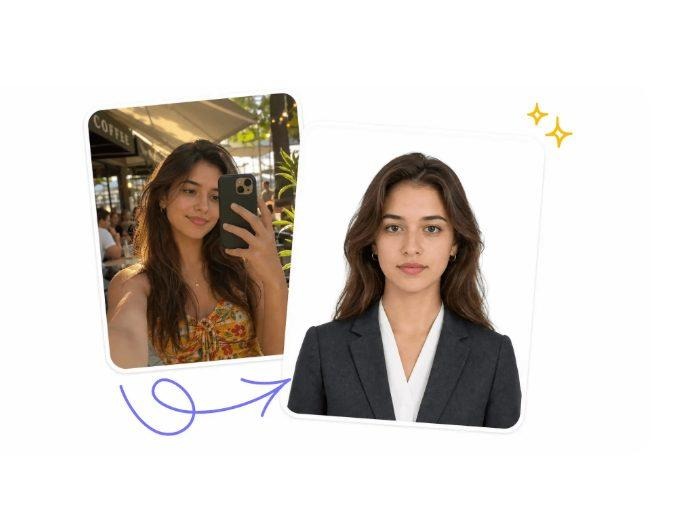
A casual mirror selfie turned into a compliant passport photo. Source: overchat.ai, July 2026.
Why use an AI passport photo maker at all?
A passport photo booth or pharmacy counter charges $15 to $20 and still makes you sit for a shot where you blink or look exhausted. An AI passport photo maker takes a photo you already have, then crops it, fixes the lighting, swaps in a regulation background, and sizes it for your document. The whole thing takes under a minute, and depending on the tool costs little or nothing.
These tools run on image-to-image generation models. You upload a face, the model rebuilds the shot to official specs, and you download a print-ready file. Modern models handle casual input surprisingly well, so a phone selfie against a kitchen wall is enough to start.
Which AI passport photo tools are worth using in 2026?
We compared five tools that actually produced usable, compliant results. Here is the quick view before the details.
| Tool | Free plan | No signup | Attire change | Glasses removal | Paid price |
| Overchat AI | Freemium | No | Yes | Yes | $14.99/mo · $49.99/yr |
| PassportMaker | Yes | Yes | Yes | No | From $10/mo |
| PhotoGov | Limited | Yes | No | No | From $4.90/photo |
| NoteGPT | 2/day | No | Yes | No | From $9.99/mo |
| PhotoAid | No | No | No | No | ~$11.95–$16.95/photo |
1. Overchat AI — best overall
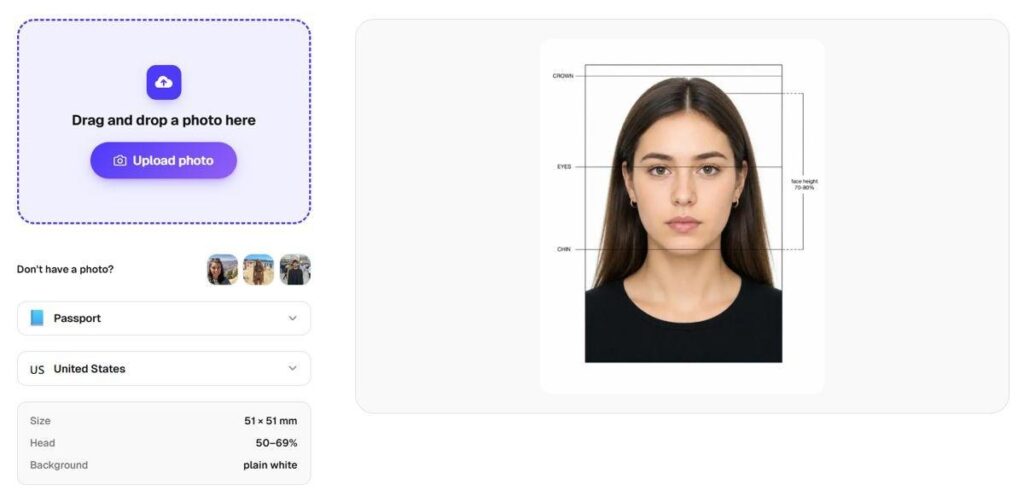
The Overchat AI passport photo tool with live head-position guides. Source: overchat.ai, July 2026.
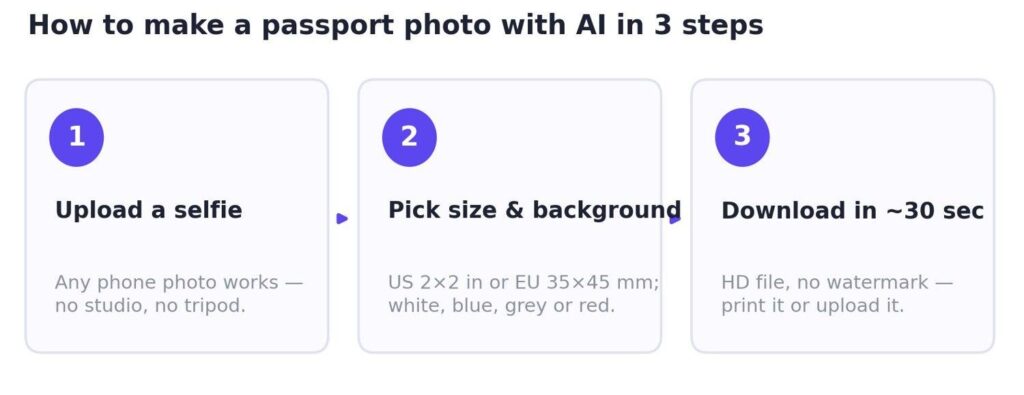
Overchat’s ai passport photo maker runs on the SeedDream 5.0 image model, which is built for photo editing and detail preservation. You upload a selfie, pick a size (2×2 in for the US, 35×45 mm for the EU, 33×48 mm for China, 35×35 mm for India), choose a background color, and hit Generate. A result comes back in roughly 30 seconds at HD resolution with no watermark.
What separates it from the rest is a set of features no other tool bundled together: it can remove your glasses, adjust your expression to a neutral look or a natural smile, and swap a casual top for a formal blazer. It supports 50+ countries and four background colors, including the red backdrop a few visas require. On price, Overchat is freemium: the account is free, but generating and downloading the final photo is a paid feature ($14.99/month or $49.99/year).
Pros: No watermark, HD output, glasses removal, attire change, expression control, dedicated iOS and Android apps.
Cons: Needs a free account, and generating the photo is a paid feature; always check the result against official rules before submitting.
2. PassportMaker — strong document coverage
PassportMaker is a dedicated passport-photo app with a clean mobile-first design. You pick your country and document from a list of 100+ types, upload a photo, and it handles cropping, background removal, and sizing. Like Overchat, it can swap your outfit for a shirt or suit, and it enhances blurry input.
Pros: 100+ document types, AI dress change, blurry-photo enhancement, iOS and Android apps.
Cons: No glasses removal, no expression adjustment, and the web version pushes hard toward the mobile app.
3. PhotoGov — widest compliance coverage
PhotoGov covers over 900 document types across 200 countries and follows ICAO biometric standards down to head-height ratios and eye-level positions. That makes its output the most technically compliant here, but it charges $4.90 per photo. It advertises a 200% refund if a photo is rejected, though some Trustpilot reviewers report friction claiming it.
Pros: 900+ documents, explicit ICAO compliance, large Trustpilot review base.
Cons: Per-photo pricing, no attire change or glasses removal, limited free tier.
4. NoteGPT — casual use, limited free runs
NoteGPT is a broad AI-tools platform with a passport feature attached. It runs on the older Nano Banana model, so in testing it was more prone to odd output, occasionally rendering a passport page around the frame. The free tier caps you at two generations per day, and it requires an account.
Pros: Style presets, doubles as a headshot generator, part of a wider toolkit.
Cons: Account required, only 2 free images per day, no government-standard validation.
5. PhotoAid — AI plus a human check
PhotoAid, a Polish company running since 2012, pairs AI cropping with a human expert who reviews each photo against official rules within about a minute. It has processed over 11 million photos and offers a 200% money-back guarantee. The catch is price: there is no free plan, and a digital photo runs $11.95 to $16.95.
Pros: AI plus human verification, money-back guarantee, long track record.
Cons: No free plan, no attire change, glasses removal, or expression control.
What are the passport photo requirements by country?
Every country sets its own size, background, and head-height rules. Match these before you generate, then confirm the final file against the official government page, since specs change.
| Country / Document | Size | Background | Head height | Resolution |
| United States — Passport & visa | 2×2 in (51×51 mm) | White | 25–35 mm | 600×600 px |
| United Kingdom — Passport | 35×45 mm | Light grey / cream | 29–34 mm | 600×750 px |
| Schengen — Visa & EU passport | 35×45 mm | White / light grey | 32–36 mm | 413×531 px |
| Canada — Passport | 50×70 mm | Plain white | 31–36 mm | 420×540 px |
| India — Passport, OCI, Aadhaar | 35×35 mm | White | 25–35 mm | 350×350 px |
| China — Visa | 33×48 mm | White / light blue | 28–33 mm | 354×472 px |
| Japan — Passport | 35×45 mm | White / off-white | 32–36 mm | 413×531 px |
How much do you actually save?
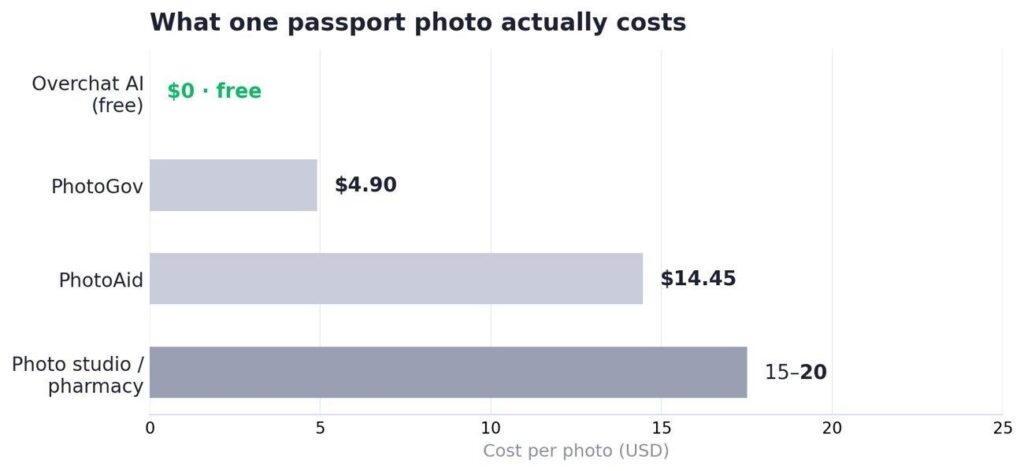
A studio or pharmacy sitting costs $15 to $20 for one set. With a free AI tool you spend nothing on the digital file, and if you need prints, most generators export a 4×6 sheet you can print at Walgreens, CVS, Walmart, or FedEx for about $0.40. For a family passport renewal, that difference adds up fast.
Overchat AI does far more than passport photos
Worth knowing if you land on Overchat for the passport tool: the passport maker is one small corner of the platform. Overchat AI is an all-in-one app with 150+ purpose-built tools for image, video, audio, and text, and it runs on the latest models from GPT, Claude, Gemini, Grok, Kimi, and Qwen. So the same account that fixed your visa photo also writes cover letters, edits images, generates video, and answers research questions across several frontier models at once.
That breadth is the practical draw. Instead of paying for ChatGPT, Claude, and Gemini as three separate subscriptions, you reach all of them through one interface for a lower combined cost. It works on web, iOS, and Android and is used by more than 350,000 people. For most users, the passport feature is simply how they discover a tool they end up keeping for everything else.
Frequently asked questions
Are AI passport photos accepted by governments?
Yes, if the photo meets official specs. Agencies judge the result — correct size, plain background, neutral expression, proper head position — not whether AI cropped it. Reputable tools do not alter your facial features. Always review the final image against your country’s guidelines before submitting.
How much does an AI passport photo cost?
Free tools like PassportMaker cost nothing for the digital file, while Overchat AI gives a free account but charges to generate ($14.99/month or $49.99/year). Per-photo services run $4.90 to about $17. Prints at a pharmacy add roughly $0.40 for a 4×6 sheet, versus $15 to $20 for a full studio sitting.
Can I make a passport photo from a regular selfie?
Yes. For best results use a photo taken at arm’s length or farther, face clearly visible, no heavy shadows. Modern AI models handle casual shots well, replacing the background and correcting framing automatically, so even a phone selfie against a plain wall works.
What is the best AI passport photo maker overall?
Overchat AI is the strongest overall in 2026. It adds no watermark and is the only tool tested that bundles glasses removal, expression adjustment, and a casual-to-formal outfit change in one interface, with results in about 30 seconds. It runs on a free account with paid generation; if you want a genuinely free download, PassportMaker is the best no-cost pick.